Ansible is a powerful automation tool that simplifies operations by automating manual tasks like configuration management, provisioning, and deployment. Here’s why it stands out:
Ease of Use – Uses YAML for configurations, making it simple and human-readable.
Agentless Architecture – No need to install agents on managed systems, reducing overhead and security risks.
what are the things ansible can do?
Configuration Management – Maintain consistent system configurations across multiple machines.
Provisioning – Automate the setup of servers, VMs, and cloud instances.
Deployment – Streamline application deployment processes.
Network Automation – Manage network devices efficiently.
Shell Scripting vs Python vs Ansible
| Feature | Shell Scripting | Python | Ansible |
| Cross-platform compatibility | Limited (may not work across Linux & Windows VMs) | Better but requires adaptation | Highly compatible |
| Learning Curve | Basic shell knowledge required | Requires good Python skills | YAML knowledge is sufficient |
| Maintenance | Hard to maintain for complex tasks | Can become complex over time | Easy to maintain |
| Complexity | Can get complex for large automation | Moderate complexity | Minimal complexity |
Prerequisites for Ansible: Password less Authentication
To set up Ansible, passwordless SSH authentication is essential. There are two methods to achieve this, both relying on the “ssh-copy-id” command:
Providing SSH keys in the initial step
Providing a password in the initial step
Once configured, you can seamlessly log into the managed node from the control node using:
“ssh username@ip”
Ansible Installation
The easiest way to install Ansible is by referring to the official Ansible documentation, where you’ll find installation instructions tailored to your operating system.
Visit: https://docs.ansible.com/ansible/latest/installation_guide/installation_distros.html
Ansible Inventory
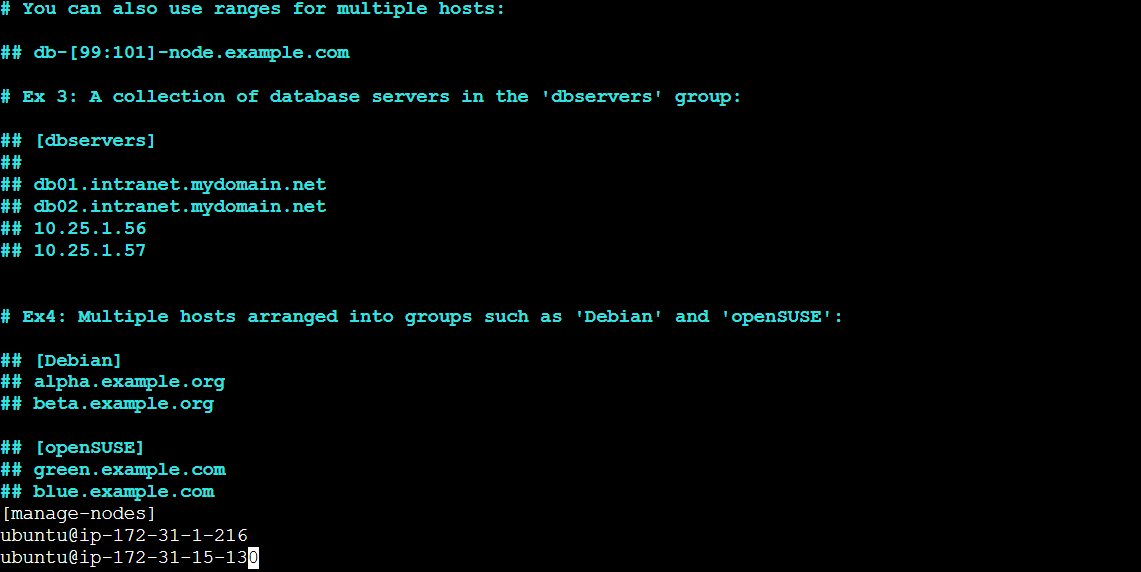
The Ansible inventory file defines managed nodes by specifying their IP addresses and usernames. It can be written in either INI or YAML format.
You can organize managed nodes into one or multiple groups based on your requirements. By default, Ansible provides a hosts file during installation, which can be used as the inventory file.
Ansible adhoc commands
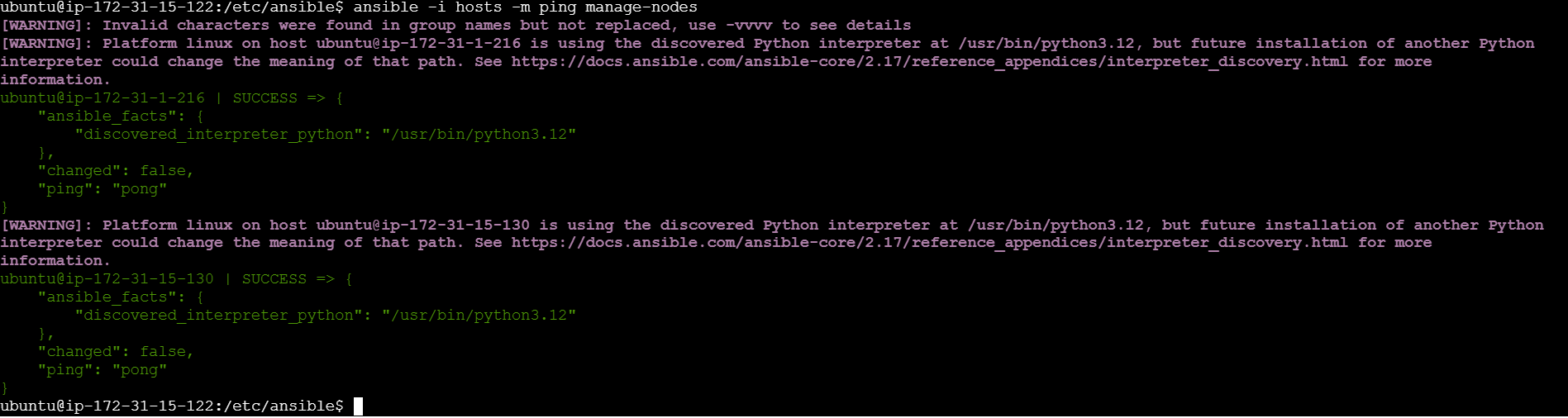
Ansible ad-hoc commands are used for executing simple, one-time tasks without writing a playbook. They are ideal for:
✅ Checking connectivity between the control node and managed nodes
✅ Installing packages or performing quick system tasks
However, ad-hoc commands cannot be used for multi-step processes—for that, you need playbooks. you can refer official doc for more commands and various use cases:
https://docs.ansible.com/ansible/latest/command_guide/intro_adhoc.html
common tasks devops do with adhoc commands
managing files
rebooting servers
managing users and groups
managing packages
managing services
Ansible Playbook
yaml basics
Strings, Numbers and Booleans:
string: Hello, World!
number: 42
boolean: true
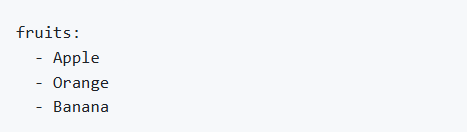
List
Dictionary
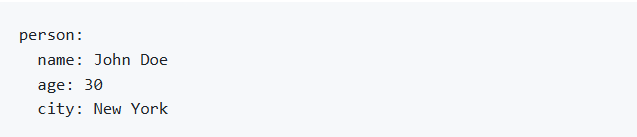
List of dictionaries
YAML allows nesting of lists and dictionaries to represent more complex data.
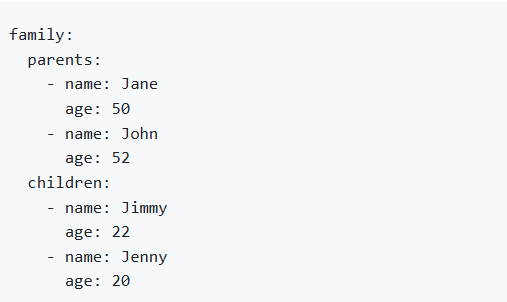
Playbook Structure
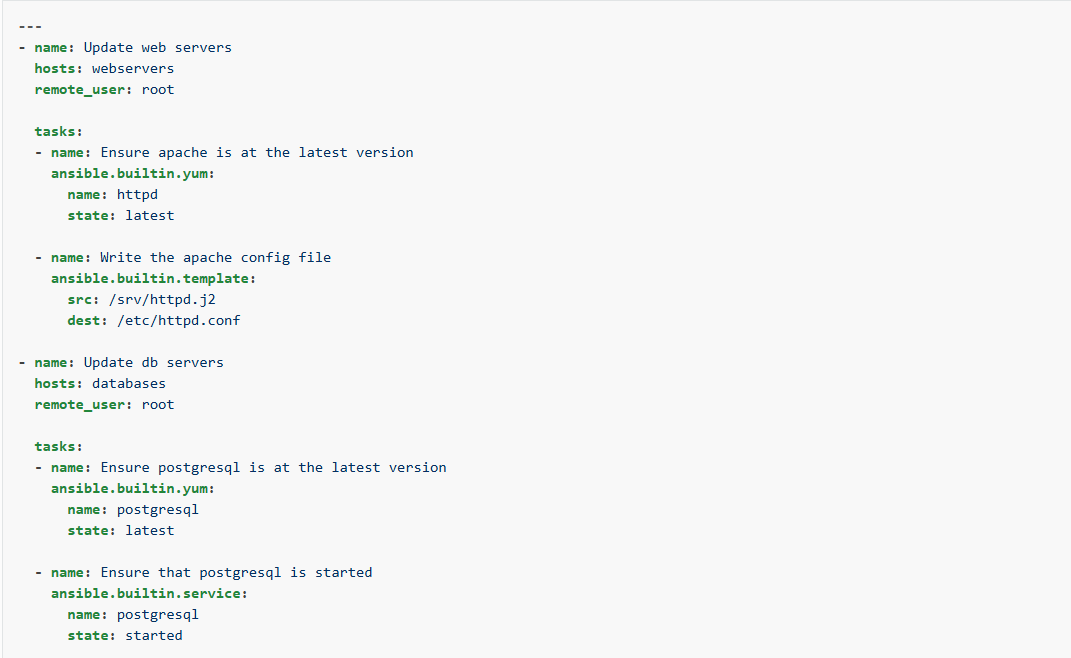
This playbook basically shows two plays that update and configure web servers and database servers separately. The first play targets webservers and ensures that Apache (httpd) is installed and updated. It also deploys an Apache configuration file. And next play targets databases and ensures that PostgreSQL is installed, updated, and running. Moreover, Proper indentation is crucial in Ansible playbooks. Incorrect indentation can lead to syntax errors or unexpected behavior. Each key like tasks, name, hosts should be properly aligned to maintain clarity and functionality.
Content of the playbook
tasks - Tasks are individual actions within a play that use modules to perform operations on managed nodes. Each task is executed in order and can include conditionals, loops, and handlers.
modules - Modules are the building blocks of Ansible tasks. They are small programs that perform a specific action on a managed node, such as installing a package, copying a file, or managing services.
collections - Collections are a distribution format for Ansible content. They bundle together multiple roles, modules, plugins, and other Ansible artifacts. Collections make it easier to share and reuse Ansible content.
plays - A Play is a single, complete execution unit within a playbook. It specifies which hosts to target and what tasks to execute on those hosts. Plays are used to group related tasks and execute them in a specific order.
Ansible roles
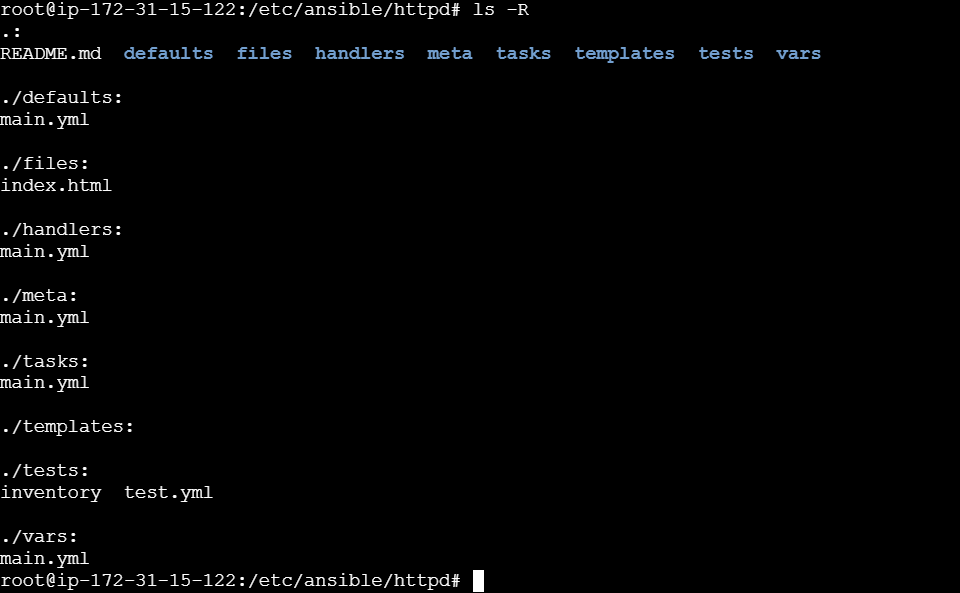
An Ansible role is a reusable, self-contained unit of automation that is used to organize and manage tasks, variables, files, templates, and handlers in a structured way.
Roles help to encapsulate and modularize the logic and configuration needed to manage a particular system or application component.
This modular approach promotes reusability, maintainability, and consistency across different playbooks and environments.
Components of ansible roles
Tasks - The main list of actions that the role performs.
Handlers - Tasks that are triggered by changes in other tasks, typically used for actions like restarting services.
Files - Static files that need to be transferred to managed hosts.
Templates - Jinja2 templates that can be rendered and transferred to managed hosts.
Vars - Variables that are used within the role.
Defaults - Default variables for the role, which can be overridden.
Meta - Metadata about the role, including dependencies on other roles.
Library - Custom modules or plugins used within the role.
Module_defaults - Default module parameters for the role.
Lookup_plugins - Custom lookup plugins for the role.
Directory structure of an ansible role
Why use ansible roles?
modularity - Roles allow you to break down complex playbooks into smaller, reusable components. Each role handles a specific part of the configuration or setup.
readability - Roles make playbooks cleaner and easier to read by abstracting away the details into logically named roles.
maintainability - By organizing related tasks into roles, it becomes easier to manage and maintain the code. Changes can be made in one place and applied consistently wherever the role is used.
Ansible galaxy
A platform provides by ansible for get the pre-built roles and also we can upload newly created roles to platform.
Github integration with ansible
github configure with vms - we should generate github API token and configure with our github credentials.
ansible galaxy configure for upload roles - first of all we should login with our github acc and then we should generate token in ansible galaxy platform for upload roles
Ansible collections
those are define as apart from ansible builtin module. we use this for call to third party APIs. you can use official doc for call APIs like aws,f5 or github according to your requirements. And also, when you use collections for call APIs you can use vault for secure your credentials. As well as we use jinja2 templating for create playbooks in collections.
Ansible variables
Ansible has 22 variables with different priorities if you want to work with them you can read the official doc directly and no need to remember them. you should remember extra variables has highest precedence. And also you should remember most common used places of variables default , variable, group variables.
Error handling
ignoring failed commands - these errors directive only works when the task can run and returns a value of ‘failed’
ignoring unreachable host errors - Ansible ignores the task errors but continues to execute future tasks against the unreachable host.
resetting unreachable hosts - f Ansible cannot connect to a host, it marks that host as ‘UNREACHABLE’ and removes it from the list of active hosts for the run. You can use meta: clearhosterrors to reactivate all hosts, so subsequent tasks can try to reach them again
Defining failure
Ansible lets you define what “failure” means in each task using the “failed_when” conditional.
Ansible vault
This is use for securing confidential data like access keys,secret keys and API tokens. This method use encrypted format for secure credentials and it can block unauthorized access.